Search your collection
Find anything by name, note, tag, location, or catalog detail.
Search covers what you actually own. It never invents matches, and it never goes near the network.
Steps
- Tap the search field in the bar at the bottom of the screen. On Mac, use the search field in the toolbar.
- Type — a name, part of a name, a note, a tag, a location, a set number.
- Results replace the home screen as you type. Tap one to open it, or long-press to favorite it. Tap the × in the field, or Cancel, to get home back.
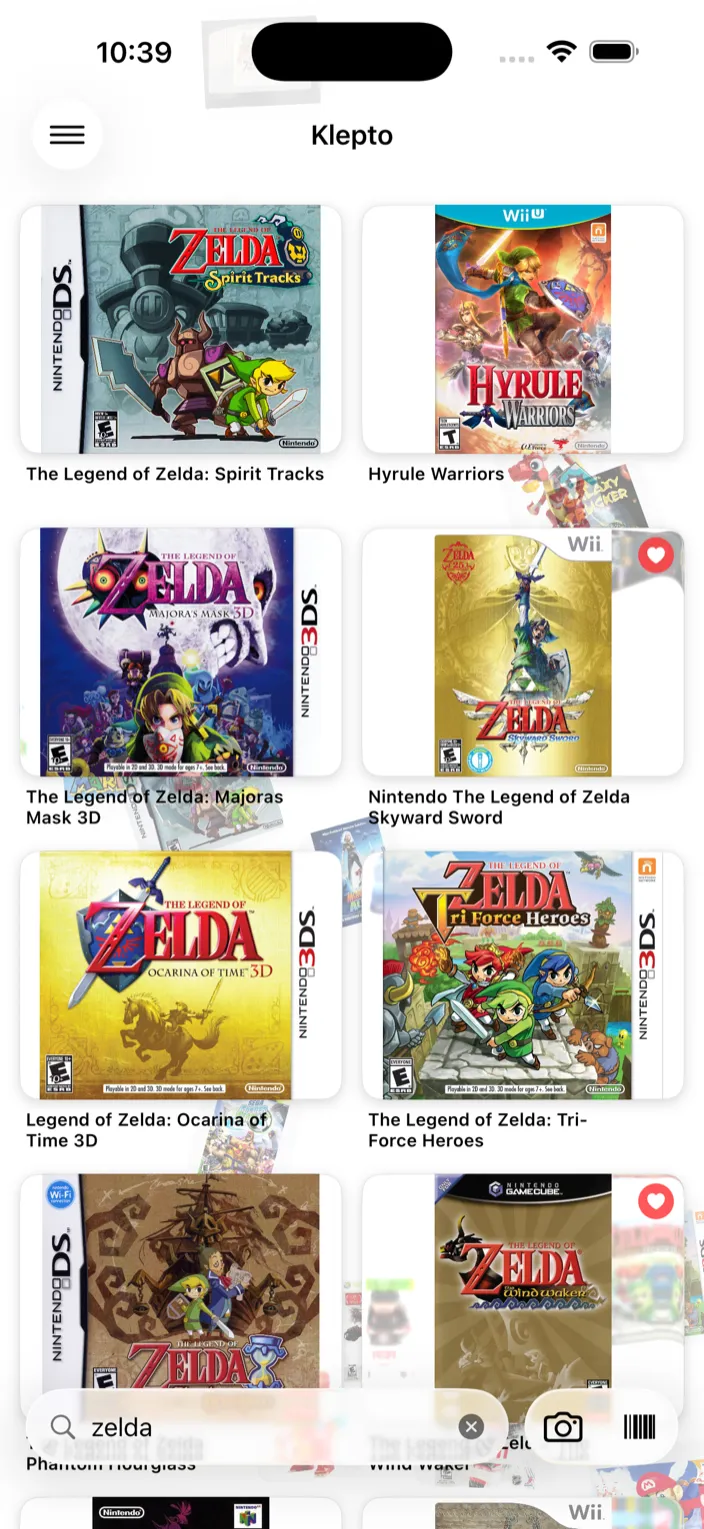
What search covers
- Item names
- Collection names
- Tags and notes
- Location
- Catalog details — LEGO set numbers, ISBNs, consoles, publishers, and so on
Matches are on the start of words, so “cat” finds Catan and “spir” finds Spirit Tracks. Several words narrow the results: “zelda 3ds” finds only the 3DS games.
Inside a collection
The same field works inside a collection, and there it searches only that collection — by name, tag, or note. Handy in a big Video Games list.
Tips
- Search is instant and local. No network, works offline, nothing leaves the device.
- Items only show up if you’ve added them. Klepto doesn’t search catalogs from here.
- Nothing matching? You get Not in your collection — which is often the answer you were after in the shop.